FLASH SALE Get 20% OFF everything using the coupon code: FLASH20 View Pricing Plans →
Theme Documentation
Plugin Documentation
Starting with Foodica 2.0, you can control what menu is displayed on mobile devices. All you have to do is head over to the Menus page, create a new menu or assign an existing one to the Mobile Menu location.
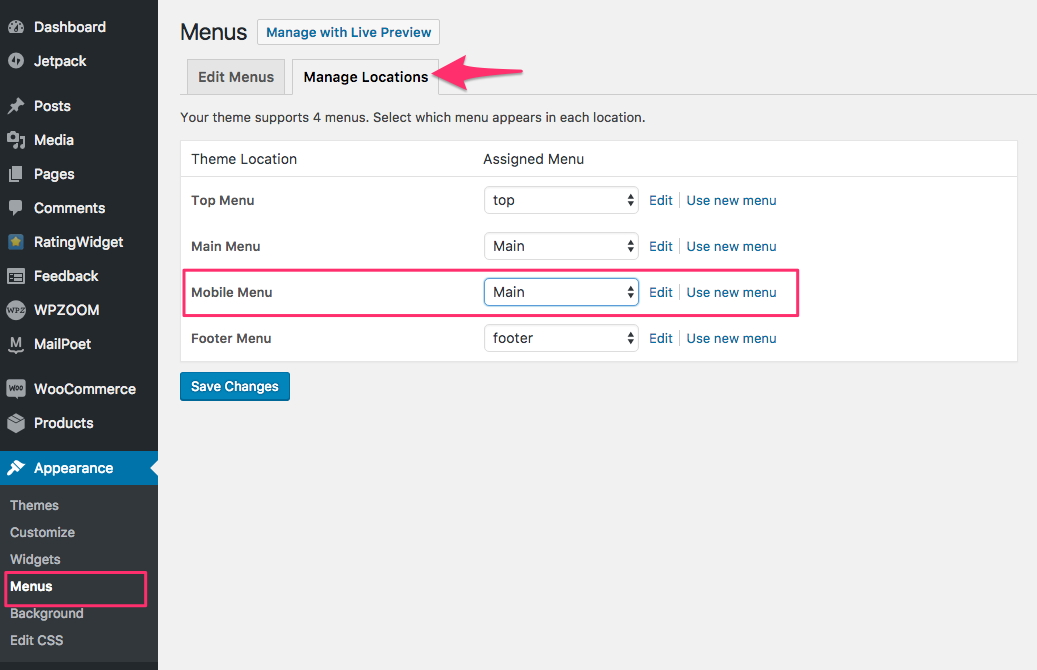
Usually, most people assign their Main menu as a Mobile menu, but you can also create a separate menu in which you can include links shown in the Top menu on Desktop computers.
In this way, your Mobile menu can be a menu with more links to combine both Top & Main menus, as on Mobile devices, the theme displays just 1 menu location.
Subscribe to our newsletter to get exclusive discounts and new product launches right in your inbox.
You have successfully joined our subscriber list.
